Tiếng Việt
Install SoftEther VPN Server on a VPS with One Command

Using public VPN services can be convenient, but they often rely on shared IP addresses and offer limited control over your data. For businesses and advanced users, building a self-hosted VPN Server is the optimal way to obtain a dedicated IP and maintain full control over security and network infrastructure.
You can instantly deploy a SoftEther VPN Server on a Linux VPS (Ubuntu, Debian, CentOS/RHEL, AlmaLinux, Rocky) using just a single command via the SoftEther VPN Server Auto Installer Script developed by VietHosting:
curl -O https://mirrors.viethosting.com/scripts/softether-installer.sh && bash softether-installer.shThis tool fully automates the entire process: compiling the SoftEther core, optimizing Kernel parameters, configuring firewall ports (UFW/Firewalld), provisioning a Let's Encrypt SSL certificate, and initializing multi-protocol routing.
1. What is the SoftEther VPN Server Auto Installer?
The SoftEther VPN Server Auto Installer (Single IP Edition) is an enterprise-grade Bash automation tool developed by VietHosting, designed to fully automate and optimize the deployment of a SoftEther VPN server on VPS or dedicated systems with a single public IPv4 address.
This solution enables you to build a fully functional, multi-protocol VPN infrastructure within minutes, with a pre-optimized network architecture that ensures stability, security, and zero IP conflicts.
Key Features:
- Flexible Network Topology (Dual Mode): Choose between:
- Conflict-Free Routing: Automatically configures the internal subnet
10.8.30.0/24, eliminating IP conflicts with local Wi-Fi, corporate LANs, or ISP networks. - Automated Firewall Integration: Detects the system environment and applies routing rules compatible with
iptables,nftables, and integrates seamlessly withUFWorFirewalld. - SSL & Security Automation: Built-in Let's Encrypt integration for automatic SSL provisioning and renewal, optimized for secure MS-SSTP (HTTPS 443) tunnels.
- Advanced Session Control: Automatically detects and terminates all active sessions before removing a user to prevent unauthorized access.
2. System Architecture After Running the Auto Installer
In just 2–3 minutes of running the automated script, you will own a complete virtual private network server with the following technical features:
- Multi-Protocol: The server simultaneously supports
L2TP/IPsec,MS-SSTP,OpenVPN, and SoftEther Native. - Dedicated Static IP: Directly utilizes the IPv4 of your VPS, ensuring no cross-sharing with other users.
- Valid SSL: Auto-integrates Let's Encrypt SSL to encrypt traffic (especially crucial for bypassing firewalls using the SSTP protocol over Port 443).
- Smart Routing: Automatically provisions a Class A internal IP subnet (10.8.30.0/24) via
SecureNATorLocal Bridgeto prevent IP conflicts with personal or corporate Wi-Fi networks.
3. Self-Hosted VPN Server vs. Commercial VPN
Managing your own VPN Server brings several core advantages over renting periodic commercial VPN services:
| Criteria | Public VPN (Commercial) | Self-Hosted VPN Server |
|---|---|---|
| IP Address | Shared IP, easily blacklisted. | Dedicated IP with a clean reputation. |
| Log Management | Dependent on provider policies. | You own the server; absolute control over logging. |
| Firewall Bypass | Often identified and blocked by ISPs. | Stable operation, operates over HTTPS (port 443) to bypass firewalls. |
| Intranet Access | Only used for anonymity on the Internet. | Set up Site-to-Site VPN for secure access to internal servers. |
4. Deploying SoftEther VPN Server with the Auto Installer
Instead of manually performing dozens of steps—from downloading source code and compiling software to configuring routing and setting up certificates—the SoftEther VPN Server Auto Installer developed by VietHosting packages this entire process.
System Requirements
- A fresh Linux VPS (Ubuntu 20.04+, Debian 10+, CentOS/Alma/Rocky 8+).
rootaccount orsudoprivileges.- (Optional) A Domain name with an A record pointing to the VPS IP for automatic SSL generation.
Execution Command
curl -O https://mirrors.viethosting.com/scripts/softether-installer.sh && bash softether-installer.shDuring initialization, the script will prompt for a few basic parameters:
- Domain & Email: Used to register Let's Encrypt (press Enter to skip if exclusively using IPv4).
- Network Topology: Select
SecureNAT(Default, auto-routing) orLocal Bridge(High performance, native routing via Kernel). - Account Creation: Provide a username and password for the first administrative/connection account.
5. Multi-Platform Connectivity Methods
Thanks to the multi-protocol platform pre-configured by the script, users are not restricted to a single application. Upon successful user creation, the tool automatically outputs connection details for 4 platforms:
- L2TP/IPsec: Directly use the built-in VPN settings on Windows, macOS, iOS, or Android via a Pre-shared Key (PSK).
- MS-SSTP: A protocol tailor-made for Windows that operates over standard HTTPS (Port 443) to seamlessly bypass strict firewalls.
- OpenVPN: The script automatically exports a dedicated
.ovpnconfiguration file. Ideal for use with OpenVPN Connect, helping to maintain a stable connection when switching networks (e.g., from Wi-Fi to 4G). - SoftEther Native: The official, proprietary client offering the highest encryption processing speed and flexible traffic routing capabilities.
6. CLI User Management on the VPN Server
Post-installation system operations are heavily simplified. To add or remove an account, simply re-run the script file. The system will automatically detect the active SoftEther Server and display an interactive CLI Menu:
bash softether-installer.sh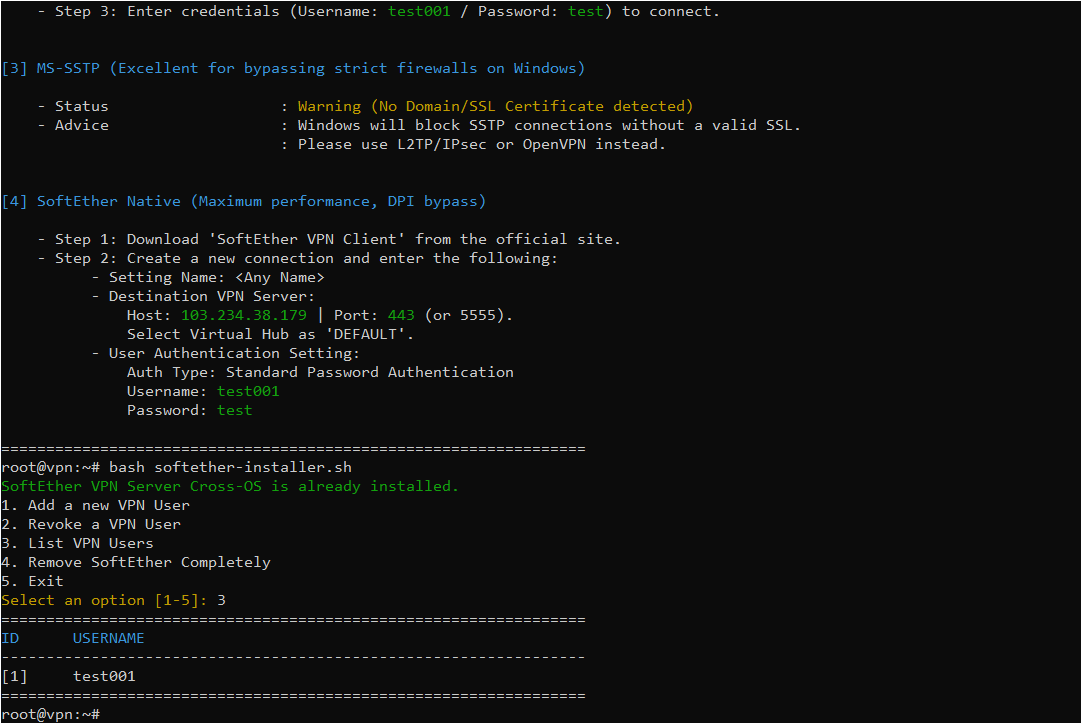
- Add a new VPN User: Initialize a new user and automatically render a dedicated OpenVPN configuration file.
- Revoke a VPN User: Delete a user from the database. Integrates Session Control: proactively finds and immediately terminates (kicks) all active connection sessions for that user.
- List VPN Users: View a statistical breakdown of all users currently authorized on the system.
7. Common Use Cases for Self-Hosted VPN Servers
8. Why Build Your VPN Server on a VietHosting VPS?
VPN data encryption (e.g., AES-256-GCM) constantly demands continuous computational power from the CPU. Therefore, your virtual server infrastructure plays a decisive role in network speed.
- Full KVM Virtualization: Unlike oversold systems, VietHosting's KVM platform provides dedicated CPU and RAM resources, ensuring bulk encryption processes never bottleneck.
- IP Reputation: Our infrastructure provisions clean IPv4 ranges, strictly excluded from international blacklists, securing your business operations.
- High-Speed Uplink: Servers connect via a 1Gbps network port with optimized international routing, seamlessly handling the data transfer needs of multiple concurrently connected devices.
9. Conclusion
Utilizing the SoftEther VPN Server Auto Installer is the most optimal and time-efficient method for deploying a multi-protocol virtual private network server. Paired with a premium VPS, businesses and individuals can fully control network routing, enable secure remote access, protect internal data, and maintain online activities on a stable, private IP identity.
Avoid shared IP risks, account bans, and unstable VPN performance. VietHosting provides KVM VPS solutions with clean IP ranges, 1Gbps bandwidth, and 24/7 technical support to power your private VPN Server infrastructure.
More Technical Guides
Explore additional technical guides and practical tutorials to build and optimize your VPN Server on a Linux VPS infrastructure.
- SoftEther VPN Server Multi IP – Assign Dedicated IP per User
- Best VPN Protocols for Linux VPS – Comparison & Setup Guide
- How to Install IPsec/IKEv2 VPN on a Linux VPS (Complete Guide)
- How to Install WireGuard VPN on a Linux VPS (Complete Guide)
- Install OpenVPN on a VPS with One Command (Auto Installer)
- What Is a Vietnam VPS? Benefits & Comparison to Offshore VPS