Tiếng Việt

Introduction to VH Benchmark Script
VH Benchmark Script is an open-source VPS and server benchmark tool developed by VietHosting. The script is designed to quickly test CPU performance, Disk I/O and network speed on Linux servers using a single command.

VH Benchmark Script is an open-source server benchmarking tool developed by VietHosting. This utility is a core component of the Server Tools directory within the VietHosting Sysadmin Resource Hub.
With just one command line, you can accurately evaluate CPU power, Disk I/O read/write speeds, and network quality from your server to various nodes in Vietnam and worldwide.
1. What is VH Benchmark Script?
VH Benchmark Script is an open-source Bash script designed to quickly test the CPU performance, Disk I/O, and network speeds of Linux servers. The script measures connection speeds to multiple nodes across Vietnam and global locations, helping evaluate real-world server performance and network quality.
Developed by VietHosting, the script aims to offer a simple, transparent, and easy-to-use method for testing server performance. Users can run the benchmark with a single command and view the results directly in the terminal.
Unlike many complex benchmarking tools that require additional software installation, VH Benchmark Script runs natively on most popular Linux distributions. What sets this tool apart is its capability to measure network speeds to major Vietnamese ISPs, such as VNPT, Viettel, and FPT, alongside numerous global nodes, providing more realistic network performance results for users in Vietnam.
2. Why Benchmark Your VPS or Server?
Benchmarking a VPS or server allows you to assess the system's actual performance, helping you identify potential bottlenecks related to CPU, storage speed (Disk I/O), or network bandwidth limitations.
By reviewing the result tables, you can easily verify whether the hardware configuration matches the provider's commitments. It also provides objective data for comparing different hosting providers before deploying your system into a production environment.
It is highly recommended to benchmark your system in the following critical scenarios:
- Immediately after deploying a new KVM VPS or Dedicated Server to verify the hardware configuration.
- When suspecting physical node overload (e.g., encountering high CPU Steal or severely degraded Disk I/O).
- When gathering objective networking data to compare connectivity across different data centers.
- After upgrading server resources (CPU, RAM, Storage) to confirm the system fully recognizes the new capacity.
3. Key Benchmarking Metrics
Upon execution, the script gathers and benchmarks the most critical components that determine server performance:
- System Information: Displays CPU model, core count, clock frequency, RAM capacity, disk space, operating system, and virtualization technology (e.g., KVM, VMware).
- Disk I/O Performance: Tests sequential write speed using the
ddcommand and automatically measures random 4K read/write speeds usingfioif installed. - Network Speed: Measures download speeds from network nodes in Vietnam and multiple international regions (Asia, Europe, Americas).
- ISP Information: Displays the server's public IP address, ASN, and network provider name.
4. How to Install and Use VH Benchmark Script
The benchmarking process is typically completed very quickly, taking only 2–3 minutes depending on your VPS configuration and network connection speed.
4.1. Install Required Packages
The server must have curl installed to download the script. It is highly recommended to install fio so the script can measure disk IOPS accurately.
If your server does not have these libraries installed, run the command corresponding to your operating system (Login via SSH as root):
For Ubuntu / Debian:
apt-get update -y && apt-get install curl fio -yFor CentOS / AlmaLinux / Rocky Linux:
dnf install curl fio -y* For older distributions such as CentOS 7, you may need to install epel-release and use yum instead:
yum install epel-release -y && yum install curl fio -y4.2. Run the Benchmark Command
Execute the following command to start the comprehensive test (Including System Info, Disk I/O, and Global Networks):
curl -Lso- https://mirrors.viethosting.com/scripts/vh-benchmark.sh | bashAlternatively, if you want to save time and only test network speeds in a specific region, use the following optional parameters:
- Test connection speeds to Vietnam network nodes only
curl -Lso- https://mirrors.viethosting.com/scripts/vh-benchmark.sh | bash -s vn- Test connection speeds to international network nodes only
curl -Lso- https://mirrors.viethosting.com/scripts/vh-benchmark.sh | bash -s intl5. Sample Output
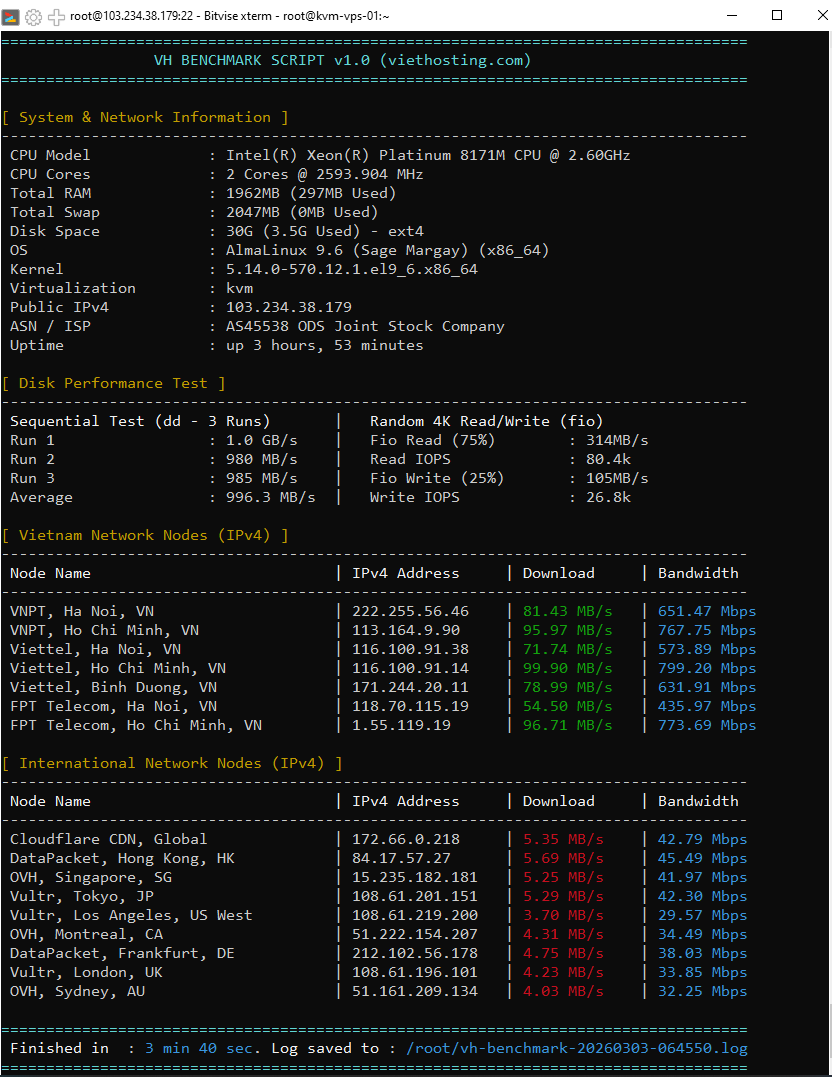
Once completed, the results will be displayed immediately on the terminal screen and simultaneously saved as a log file (e.g., /root/vh-benchmark-20260314-145751.log) in the current directory for easy sharing.
6. VH Benchmark Script vs. Other Benchmarking Tools
The table below provides an overview of the differences between VH Benchmark Script and other popular benchmarking tools:
| Core Feature | VH Benchmark Script | Other Popular Benchmark Tools |
|---|---|---|
| Network Testing Focus | Comprehensive Vietnam & Global Nodes | Almost entirely Global Nodes |
| Disk I/O Performance | Combines dd and fio |
Typically uses only one tool |
| API Rate Limit Mitigation | Yes (Automatic Fallback) | Limited support (Prone to errors) |
| Execution Speed | Fast execution (2–3 minutes) | Varies (Can be very slow) |
7. Real-world VietHosting VPS Performance Test
To illustrate how the script operates in a real-world environment, below are random benchmark results performed on a server from the basic KVM VPS plan operating within VietHosting's infrastructure.
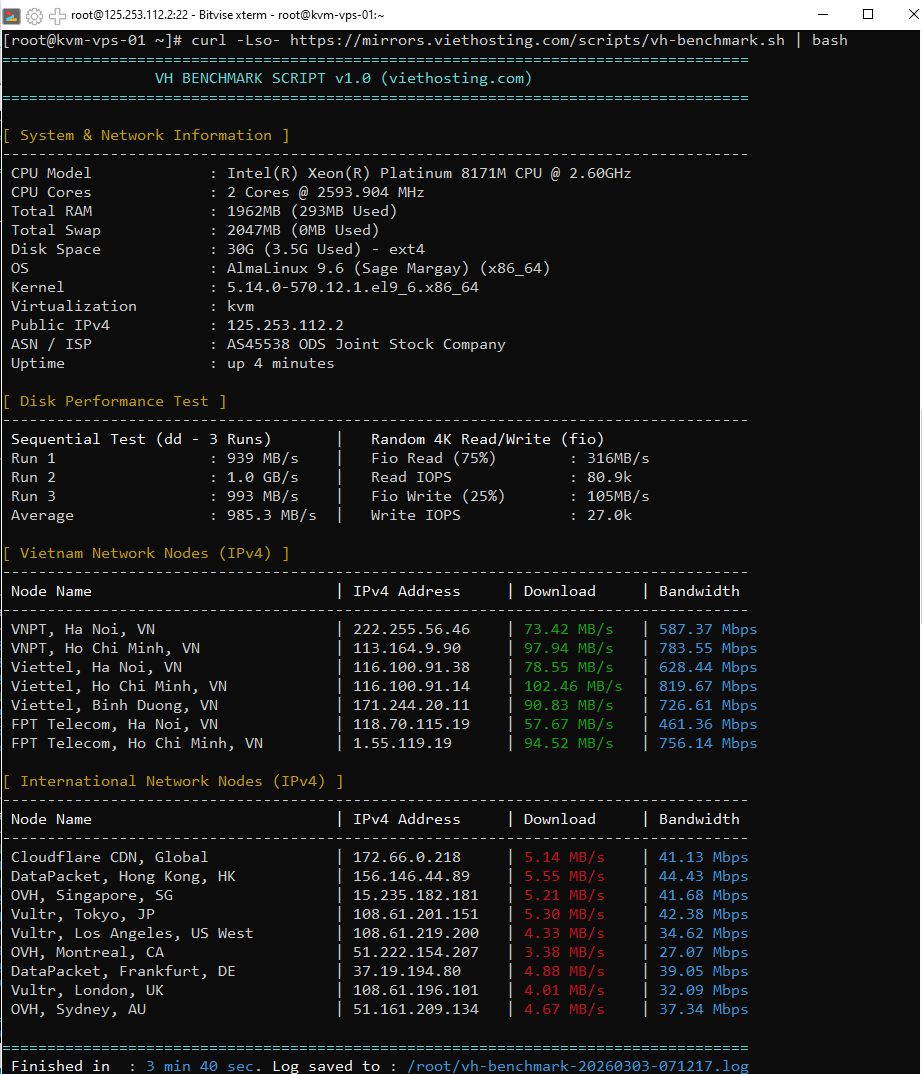
Video 01: Real-world benchmark on KVM VPS (Node features Dual Intel Xeon Platinum 8171M CPUs, SSD RAID-10 storage).
Video 02: Real-world Benchmark on KVM VPS (Legacy Infrastructure).
VietHosting's VPS plans currently offer maximum shared bandwidth configurations of up to 1 Gbps for domestic connections and 32 Mbps for international routing.
8. Conclusion
Running the VH Benchmark Script regularly is a good practice to keep track of your server's health. By displaying clear and transparent metrics, we hope this tool will serve as a valuable companion for system administrators.
You can test your system's performance using the script on our infrastructure with just a single command.
More Technical Guides
Explore additional technical guides and practical tutorials to optimize performance and manage your server infrastructure efficiently.