 Tiếng Việt
OpenVPN Multi-IP Setup: Assign a Dedicated IP per User (2026)


Build an OpenVPN Multi-IP Server with a Dedicated Public IP per User (2026 Guide)
For advertising agencies, global businesses, and multi-store eCommerce operators (Amazon, eBay, Etsy, Shopee), using a single shared IP address for multiple accounts can create severe operational risks. When multiple users access external platforms from the exact same public IP, traffic patterns may appear clustered or non-isolated, potentially triggering automated risk detection systems.
A highly scalable infrastructure solution to mitigate this risk is deploying an OpenVPN Multi-IP server. This guide explains how to transform a Dedicated Server (or Large VPS) into a centralized VPN gateway, enabling you to assign an independent, dedicated Public IPv4 address to each user with a single automated script.
1. Why Businesses Need an OpenVPN Multi-IP Architecture
While a traditional single-IP VPN secures traffic encryption, an OpenVPN Multi-IP setup is explicitly designed to achieve Identity Isolation in multi-user environments.
- 1-to-1 Public IP Routing: Each employee or team can be assigned a dedicated outbound IPv4 address using strict SNAT rules. External platforms see independent network origins instead of overlapping, shared traffic.
- Centralized Infrastructure: Instead of deploying dozens of small VPS instances to obtain separate IP addresses (which wastes resources and complicates management), you can operate a single high-performance server equipped with an attached IPv4 subnet.
- Flexible IP Grouping: The system supports both per-user dedicated IP assignments and shared IP routing for specific teams or projects, accommodating versatile operational scenarios.
The comparison table below highlights the superiority of a Multi-IP system in network management:
| Criteria | Single-IP VPN | OpenVPN Multi-IP |
|---|---|---|
| Outbound IP Structure | All users share one public IP | A dedicated or grouped public IP per user/team |
| Network Identity Separation | Limited (High risk of cluster flags) | Infrastructure-level isolation |
| Operational Scalability | Requires multiple isolated VPS instances | Single server handling an entire IPv4 subnet |
| User Revocation | Manual per-server handling | Centralized certificate and SNAT management |
2. Why Choose a Dedicated Server or Large VPS at VietHosting?
Running a high-performance OpenVPN Multi-IP gateway requires robust CPU encryption capabilities and reliable, contiguous IPv4 resources.
- Clean IPv4 Reputation: Allocated IP ranges are meticulously verified through major anti-fraud and reputation databases (e.g., Spamhaus) before deployment.
- Enterprise Hardware: Intel Xeon Platinum CPUs with AES-NI acceleration ensure stable AES-256-GCM encryption performance under heavy concurrency.
- Optimized International Routing: Hosted in Tier III data centers in Vietnam, featuring 1Gbps domestic uplinks and optimized upstream routing to ensure smooth global connectivity and low latency.
3. Automated OpenVPN Multi-IP Installation Guide
This enterprise-grade script supports OpenVPN 2.6+ and utilizes the native nftables backend on modern RHEL environments (9/10), entirely eliminating dependencies on legacy iptables. The configuration process is fully automated.
System & Network Preparation
- A Large VPS or Dedicated Server with additional IPv4 addresses attached to the primary network interface.
- A modern OS: AlmaLinux 8/9/10, Rocky Linux 8/9/10, RHEL 8/9/10, or Ubuntu 22.04/24.04+. (AlmaLinux 8/9 is highly recommended).
- Root SSH access.
Run the Installation Script
Execute the following command in your terminal to download and run the installer from VietHosting's secure mirrors:
Built-in Race Condition Protection & Persistence
The script includes file-locking mechanisms to prevent duplicate IP assignments when creating users rapidly. Furthermore, it integrates SNAT rules directly with systemd, ensuring the routing table automatically and flawlessly restores itself after any server reboot.
4. Managing Users and Public IP Assignments
After the initial installation, a CLI management menu allows you to seamlessly assign public IPs to users.
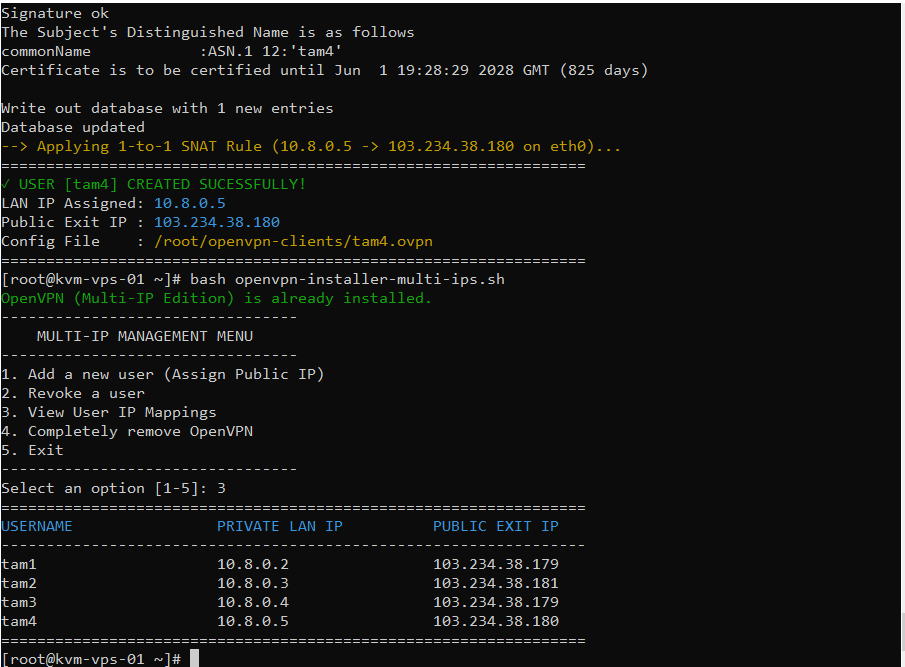
Create Users & Apply 1-to-1 SNAT Routing
- Select option 1 from the menu to create a new user.
- The script intelligently scans the network interface and lists all available public IPv4 addresses attached to the server.
- Simply enter the index number of the IP you wish to assign.
- The system automatically configures the LAN IP allocation and writes the corresponding SNAT routing rule.
- Download the generated
.ovpnprofile for immediate deployment.
Check User-to-IP Allocation Mappings
Press 3 (View User IP Mappings). A statistical table is rendered, allowing administrators to cross-check exactly which digital identity is tied to which Public IP, entirely eliminating the risk of IP mismanagement across departments.
Safely Revoke User Access
- Select Revoke a user from the menu and input the username.
- The system not only revokes the client certificate but also automatically locates and flushes the associated SNAT firewall rules, keeping your infrastructure secure and optimized.
Conclusion
An OpenVPN Multi-IP architecture enables structured network identity isolation within a highly centralized infrastructure. This approach is paramount for agencies, distributed teams, and eCommerce enterprises requiring an independent outbound public IP address per workload to maintain operational stability.
For large IPv4 subnet deployments (/26, /25, /24), explore VietHosting's Large VPS or Dedicated Server solutions. Our expert engineering team is always available to assist with IP planning and routing architecture design at no additional cost!


 Maximum, extremely low latency, stable, and less dependent on international connectivity.
 Significantly slower, entirely dependent on submarine cable quality.



