Tiếng Việt
Install OpenVPN on a VPS with One Command (Auto Installer)


In the era of remote work and cross-border e-commerce, utilizing cheap public VPN services exposes you to data leaks and account bans due to shared IP addresses (Blacklisted IPs). The ultimate solution is building your own Self-Hosted VPN on a Virtual Private Server.
You can deploy an enterprise-grade OpenVPN server on a Linux VPS (Ubuntu, AlmaLinux, Rocky) using just a single command:
This script automatically installs OpenVPN, generates the Easy-RSA certificate authority, configures the firewall, and outputs a ready-to-use .ovpn client file.
1. What You Will Build
By completing this 2-minute tutorial, you will own a private, enterprise-grade virtual network comprising:
- An OpenVPN server secured with top-tier AES-256-GCM encryption.
- An exclusive, Dedicated Static IPv4 shared with absolutely no one.
- Auto-generated
.ovpnconfiguration files to distribute to your team. - An intuitive CLI menu to Add or Revoke user access instantly.
2. Why Do Businesses Need a Self-Hosted VPN?
Owning your private VPN server provides core values that commercial giants like NordVPN or Surfshark simply cannot offer:
| Evaluation Criteria | Public VPN (Nord, Express) | Self-Hosted VPN on VPS |
|---|---|---|
| IP Address | Shared with thousands of random users | 100% Dedicated & Static IPv4 |
| Log Policies | Relies purely on the provider's promise | You own the server (Absolute Zero-Logs) |
| Intranet Security | Cannot route to corporate LAN/Local servers | Fully Possible (Port & Routing control) |
| Account Ban Risk (Ads) | Very High (Due to cross-blacklisted IPs) | Extremely Low (Clean Reputation IP) |
3. Step-by-Step OpenVPN Installation Guide
You don't need to be a seasoned System Administrator. VietHosting has packaged the heavy lifting into an automated script.
System Preparation
- A fresh Linux VPS (Ubuntu 22.04/24.04 or AlmaLinux 8/9 highly recommended).
- SSH access to your VPS with
rootprivileges.
Execute the Installer Script
In your command-line terminal, paste the following code and hit Enter:
curl -O https://mirrors.viethosting.com/scripts/openvpn-installer.sh && bash openvpn-installer.shSecurity Note: This installation script is hosted directly on VietHosting's internal Mirrors Storage, guaranteeing absolute safety, no malicious injections, and lightning-fast download bandwidth.
The script will prompt you for basic setup preferences (you can simply press Enter to accept the recommended defaults):
4. Verify Your VPN Connection
Once finished, the system outputs a file named ceo_laptop.ovpn in your /root/ directory. To verify the setup, follow these steps:
- Use an SFTP client (like WinSCP or FileZilla) to download the
.ovpnfile to your local computer. - Install the official OpenVPN Connect application (Available for Windows, macOS, iOS, Android).
- Drag and drop the
.ovpnfile into the app and click Connect. - Verify: Open your browser and go to
whatismyip.comor runcurl ifconfig.mein your local terminal. If the output matches your VPS IP, the VPN is successfully routing your traffic!
5. VPN User Management (Add/Revoke)
The brilliance of this script is its intuitive management menu. To summon the menu at any time, simply re-run the command: bash openvpn-installer.sh
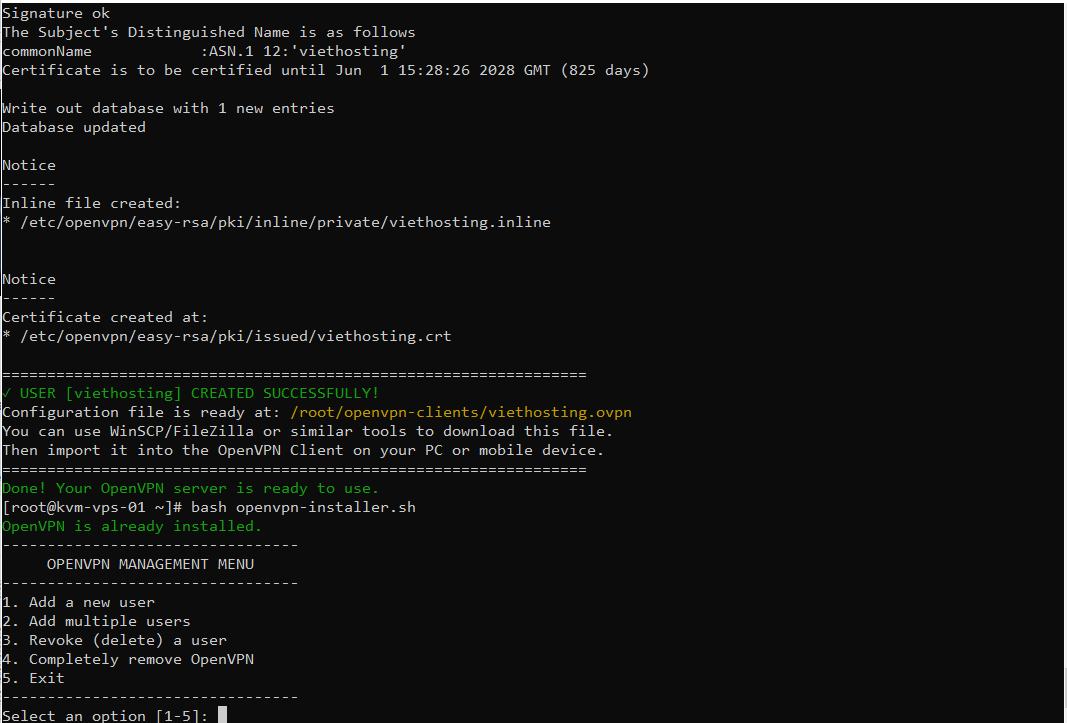
- Add a new client: Select option 1. Enter the new employee's identifier (e.g.,
marketing_team). The system instantly generates a distinct.ovpnfile for them. - Revoke an existing client: When a device is compromised or staff leaves, select option 2. Enter their username. Their certificate is immediately added to the Revocation List (CRL), terminating their access.
6. Top Use Cases for Self-Hosted VPNs
7. Why Host Your VPN on VietHosting VPS?
VPN encryption (AES-256) requires continuous CPU cycles. Running a VPN on a heavily oversold platform will result in abysmal throughput speeds.
- True KVM Virtualization: With just a basic KVM VPS (2 vCPU, 2GB RAM) at VietHosting, the dedicated hardware can smoothly handle 20-30 concurrent encrypted connections without breaking a sweat.
- Pristine IP Reputation: We provide clean IPv4 ranges, strictly filtered through international IP Reputation databases to ensure maximum trustworthiness.
- 1Gbps Bandwidth: Network routing is hyper-optimized for international paths, keeping latency (Ping) incredibly low.
8. Conclusion
Building an enterprise OpenVPN system has never been simpler. With just 1 command line and a premium VPS, you reclaim absolute control over your data flow, secure a clean static IP, and shield your business from cybersecurity threats.
Using cheap, shared VPN services forces you to share IP addresses with policy-violators, triggering automated bans from Facebook, Amazon, or Google. To permanently stop this, you need an exclusive, pristine IPv4 address.
Deploy your private OpenVPN system today on VietHosting's KVM VPS platform, featuring 1Gbps bandwidth and Enterprise SSDs. Our 24/7 technical team is on standby to help you install this VPN script completely free of charge!