Tiếng Việt
OpenVPN Server Multi IP: Assign a Dedicated IP per User


For Marketing Agencies and E-commerce businesses, sharing a single outbound IP across multiple remote workers (Single-IP VPN) can lead to chained account bans due to shared network identity. This guide provides a fully automated OpenVPN Multi-IP Server solution, helping administrators securely distribute routed IP identities to individual team members.
OpenVPN Server Multi-IP turns a single Linux VPS into a multi-IP VPN gateway capable of assigning a dedicated static Public IP to each user for Identity Isolation. You can deploy this entire server architecture with a single command:
curl -O https://mirrors.viethosting.com/scripts/openvpn-installer-multi-ip.sh && bash openvpn-installer-multi-ip.sh1. What is the OpenVPN Server Multi-IP Auto Installer?
The OpenVPN Server Multi-IP Auto Installer is an enterprise-grade Bash Script developed by the VietHosting engineering team. It is specifically designed to deploy an OpenVPN server system supporting multiple Public IP addresses on a single Linux VPS or Dedicated Server.
Instead of the random IP allocation seen in standard OpenVPN setups, this solution leverages a Client Config Directory (CCD) architecture combined with 1-to-1 SNAT routing. This allows administrators to strictly bind each VPN account to a single, static Public IP address, ensuring absolute Identity Isolation.
Key Features (Multi-IP Edition):
- Massive Subnet Scalability: Unlike standard
/24ranges, the script automatically provisions a vast10.8.0.0/20virtual network. This allows the system to manage up to over 4,000 internal IPs, perfectly accommodating large-scale campaigns. - Identity Isolation via CCD: Automatically generates static configuration files within the CCD folder upon user creation, ensuring the user receives the exact same fixed virtual IP throughout their account's lifecycle.
- 1-to-1 SNAT Architecture: Automatically scans and lists secondary Public IPs on the server. It applies a Source NAT rule directly in the firewall (iptables/nftables) to force the virtual IP's traffic to exit the internet using the specifically chosen Public IP.
- Auto-Persistence Mechanism: All IP binding rules (SNAT) are injected directly into the
systemdservice. This guarantees the routing infrastructure will automatically restore its state even if the server crashes or reboots. - Clean Revoke (Smart Garbage Collection): When revoking a user, the system doesn't merely delete the security certificate; it automatically finds and flushes the exact associated SNAT firewall rules and redundant CCD files, optimizing the server's CPU performance.
2. The VPN Server Architecture Post-Installation
After running the automated installation script on your Linux VPS, you will possess a professional, multi-layered network architecture. Here is the data flow diagram:
        [ CLIENT DEVICES ]
       (User A, User B, ...)
                 |
                 | 1. Encrypted Connection
                 ▼
        [ OPENVPN SERVER ]
   (Multiple Static Public IPs)
                 |
          2. SNAT Routing
                 |
     +-----------+-----------+
     |                       |
     ▼                       ▼
 [ IP .180 ]             [ IP .181 ]
  (User A)                (User B)
     |                       |
     +-----------+-----------+
                 |
                 ▼
        [ INTERNET ACCESS ]
(100% Identity Isolation)- OpenVPN Gateway Server: The central gateway responsible for authentication and encrypting all user data via the AES-256-GCM standard.
- User-to-IP Binding: A hard-link layer connecting the user's account certificate to their network configuration profile.
- SNAT Mapping Router: A Kernel-level routing layer. Ensures packets originating from the
10.8.x.xvirtual network are translated (NAT) to exactly one distinct Public IP address to communicate with the Internet. - .ovpn Profiles: Complete, pre-packaged Client configuration files on the Server, ready for users to import into their software (OpenVPN Connect) and use immediately.
3. Why Businesses Need a Multi-IP VPN Server
While a standard Single-IP VPN server encrypts data, an OpenVPN Multi-IP system is designed specifically to solve the problem of Identity Isolation on the internet.
This refers to the architectural separation of network identities (Public IP, Routing Fingerprints) between parallel workloads on the same physical server infrastructure to prevent linked account detection and bans.
- Preventing Chained Bans: Assign User A to exit via IP .180 and User B via IP .181. Advertising platforms (Facebook, Amazon) will see these as entirely independent personal sessions.
- Centralized Management: Instead of buying dozens of fragmented small VPS instances (wasting resources and complicating security), you manage an entire IPv4 subnet from one high-performance server.
| Criteria | Standard VPN Server (Single IP) | OpenVPN Multi-IP Server |
|---|---|---|
| Outbound IP | All users share 1 server IP | Dedicated static IP per user/group |
| Identity Separation | High risk of linked account bans | Infrastructure-level isolation (Absolute safety) |
| System Management | Fragmented across multiple servers | Centralized Identity Control on a single machine |
4. Why Choose a Dedicated Server or Large VPS at VietHosting?
Running AES-256-GCM encryption combined with complex NAT routing for multiple concurrent users requires premium IPv4 resources and powerful server hardware.
VietHosting provides massive IPv4 allocations: up to 256 IPs (/24) on Dedicated Servers and 64 IPs (/26) on Large VPS plans with clean IP reputation suitable for business use.
- Clean IP Reputation: All IPv4 addresses are rigorously verified against anti-fraud databases (Spamhaus, etc.) before deployment to clients.
- Dedicated Resources: Powered by Intel Xeon Platinum CPUs for flawless, high-concurrency encryption throughput under heavy loads.
- Optimized Global Routing: Hosted in a Tier III Data Center with a 1Gbps uplink and optimized international paths for global campaigns.
5. Automated OpenVPN Server Multi-IP Installation Guide
Our Enterprise-grade script supports OpenVPN 2.6+ and utilizes the modern nftables native backend on RHEL 9/10 operating systems.
System & Network Preparation
- A Large VPS or Dedicated Server with additional Secondary IPs already attached.
- OS: AlmaLinux 8/9/10, Rocky Linux 8/9/10, or Ubuntu 22.04+.
- Root SSH access to the server.
Run the Installation Script
curl -O https://mirrors.viethosting.com/scripts/openvpn-installer-multi-ip.sh && bash openvpn-installer-multi-ip.sh6. Managing Users and Public IP Assignments (CLI Menu)
The interactive CLI server management menu appears immediately post-installation, allowing for seamless IP allocation without complex commands:
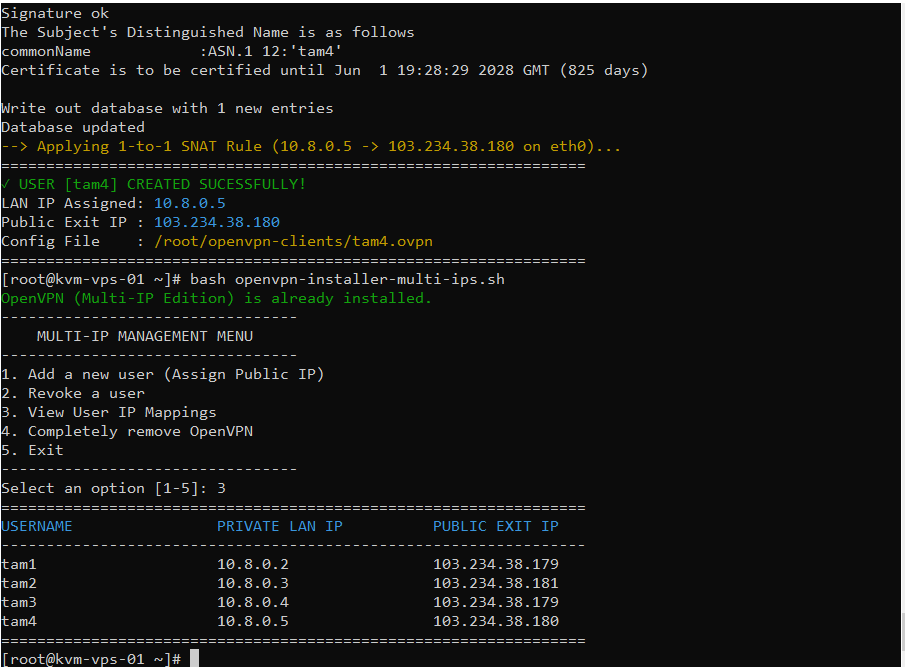
Create Users & Apply Dedicated IP Routing
- Step 1: Select 1 to add a new user (e.g., team_ads_fb).
- Step 2: The script lists all available Public IPs on the server. Choose the desired IP by entering the corresponding number.
- Step 3: The server automatically configures the routing rule and generates the .ovpn configuration profile instantly.
View User IP Mappings
Press 3 (View User IP Mappings) for a visual terminal breakdown. This function shows precisely which virtual IP is assigned to a User and which Public IP they exit from, helping Admins cross-check and prevent identity assignment errors.
Clean Revoke
- Select 2 (Revoke a user).
- When deleting a user, the script doesn't just revoke the security certificate; it automatically removes the associated SNAT firewall rules and CCD configuration files. This feature keeps your firewall routing table lightweight and optimizes CPU performance.
7. Verify Each User Uses the Correct Public IP
To ensure the User-to-IP SNAT routing is functioning perfectly, perform this quick verification:
- Distribute the generated .ovpn file to the employee and have them connect via the OpenVPN Connect client.
- Once connected successfully, instruct the user to open their local Terminal or Command Prompt and run:
curl ifconfig.meIf the output matches the exact Dedicated Public IP you assigned to that user on the VPN server, your Identity Isolation setup is working flawlessly!
8. Conclusion
The OpenVPN Multi-IP Server architecture is a powerful solution for Identity Isolation, ensuring absolute stability and safety for global multi-account operations in high-risk e-commerce environments.
Scale your infrastructure with a high-performance Large VPS, or upgrade to a physical dedicated server for large-scale Multi-IP VPN deployments. Our technical team is ready to assist you in setting up this complex architecture entirely free of charge.
Related Guides & Resources
Explore additional tutorials, technical guides, and infrastructure insights to help you deploy, optimize, and manage VPS or server environments efficiently.
- Top VPN Solutions for Linux VPS: Performance & Comparison
- Install WireGuard VPN Server on a Linux VPS (Complete Guide)
- How to Install Tailscale VPN on a Linux VPS (Complete Guide)
- Install SoftEther VPN Server on a VPS with One Command
- What is KVM VPS? The Benefits of KVM Virtualization
- What Is a Vietnam Server? Benefits & Offshore Comparison